
05. Unix
Unix
22/03/2023
Definition
Unix

is a family of multitasking, multiuser computer operating systems
that derive from the original AT&T Unix, whose
development started in 1969 at the Bell Labs research
center by Ken Thompson, Dennis Ritchie, and
others.
Dennis Ritchie
Dennis MacAlistair Ritchie (September 9, 1941 – c. October 12, 2011)
unix
https://youtu.be/XvDZLjaCJuw
grep
https://youtu.be/NTfOnGZUZDk
Unix Commands
Listing files
lslist files in current directoryls-l list files in a long formatls-a list all files (including hidden files) in current directoryls-F adds indicators to the list output to identify directories and different types of files.
For example
ls -alwould list all files in the current directory, including hidden files, in a long format.
Special characters
.the current working directory..the parent directory to working directory~your home directory/the root (top-level) directory. This is also the separator for directories*a wildcard meaning any string of characters?a wildcard meaning any single character
Files
cpfile1 file2 makes a copy of file1 and calls it file2mvfile1 file2 moves (renames) file1 to file2rmfile1 removes (deletes) file1rm-i file1 asks for confirmation that you want to delete file1
there are the
randfarguments whereris for recursive andfif for force
Directories
pwdprint the working directorycddirname change directory to dirnamecd.. change to the parent directory of the currentcd~ change to your home directorymkdirdirname makes a new directory with name “dirname”rmdirdirname removes the directory with name “dirname”.rmdir-r dirname recursively removes directories and subdirectories
Text files
catfile1 writes the whole of file “file1” to the terminal, also useful for concatenating filesmorefile1 displays the file “file1” a page at a timelessfile1 a more versatile version of “more”head-30 file1 show the first 30 linestail-25 file1 show the last 25 linestail-f file1 show the last few lines and keep updating as the file growswcfile1 counts lines, words and characters in a file
control keys
ctrl Cinterrupts whatever is currently running. (It can get you out of trouble at embarrassing moments)ctrl Zputs a foreground process into the background.ctrl Ssuspends current terminalctrl Qresumes current terminal
Permissions
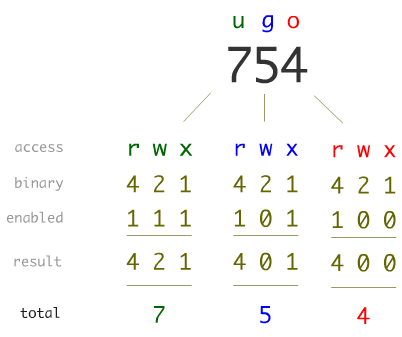
Unix allow to set ACL (access control list) to files. User ROOT (Super User) can do anything so can assign permissions. There are three sets:
- first byte of the set will give access to the OWNER of the file
- Second byte will give access to the GROUP beloging the file
- Third byte will give access privilege to anyone.
Permission bytes
List files
bash-3.2$ ls -la
total 72
drwxr-xr-x   7 sdipietr  staff    224 Mar 22 08:46 .
drwxr-xr-x  14 sdipietr  staff    448 Mar 21 14:38 ..
-rw-r--r--   1 sdipietr  staff   8196 Mar 21 14:42 .DS_Store
-rw-r--r--   1 sdipietr  staff  12387 Mar 21 16:50 05-Unix.html
-rw-r--r--   1 sdipietr  staff   3204 Mar 22 08:46 05-Unix.md
drwxr-xr-x   7 sdipietr  staff    224 Mar 21 14:53 images
-rw-r--r--   1 sdipietr  staff   1110 Mar 21 14:44 instituteStyle.html
Permission alias
uuserggroupoothersaall (equivalent to ugo)+gain-loserread permissionwwrite permissionxexecute permission
chmod chown
chmod changes file and directory permissions
chmodu+r file1 change permissions of “file1” so user (“u”) gains (“+”) read permission (“r”).chmod-R 754 directory
chgrg change group ownership
chgrpgroup1 file1 change “file1” to belong to group “group1”
chown change ownership
chown-R root:user directory